Trading on GRVT with Hummingbot: A Complete Bot Development Guide
Welcome to the GRVT connector guide for Hummingbot. GRVT is a hybrid derivatives exchange offering self-custodial perpetual futures with central limit order book (CLOB) matching. The grvt_perpetual connector lets you run automated strategies—market making, directional frameworks, and custom V2 controllers—against GRVT’s perpetual markets while managing orders through Hummingbot’s standard derivative connector interface.
What is GRVT?
GRVT (pronounced "gravity") is a hybrid perpetuals exchange that combines the performance of a centralized orderbook with the self-custody of a decentralized exchange. It is built on ZKsync's validium stack, meaning trades are matched off-chain at CEX speed but settlement is secured by Ethereum.
Key properties relevant to bot traders:
| Property | Detail |
|---|---|
| Order type | Central Limit Order Book (CLOB) |
| Settlement | ZKsync validium (non-custodial) |
| Latency | CEX-grade (~sub-10ms matching) |
| Funding rate | 8-hour perpetual funding |
| API auth | API Key + secp256k1 private key signing |
| Hummingbot connector ID | grvt_perpetual |
GRVT launched its mainnet in 2024 and currently lists major crypto perpetual pairs including BTC, ETH, SOL, and commodity proxies like PAXG (tokenised gold).
Prerequisites
Before you start, make sure you have the following ready.
Software
- Docker Desktop (recommended) OR Python 3.12+
- Git
- A code editor (VS Code recommended)
Accounts and funds
- A GRVT account at app.grvt.io with a connected wallet (MetaMask or WalletConnect)
- USDT deposited into your GRVT sub-account (minimum ~$50 recommended for testing, $200+ for live)
-
Your three GRVT credentials (covered in Connecting Hummingbot to GRVT):
-
API Key
- Secret Private Key
- Trading ID (also called
sub_account_id)
Knowledge baseline
- Basic terminal/command line usage
- Familiarity with JSON config files
- Python fundamentals if you want to customise the script strategy
Install and Start Hummingbot
Docker (Recommended)
Use Docker for the fastest and most consistent setup.
-
Clone the Hummingbot repository:
-
Start the container:
-
Attach to the client:
Note
In docker-compose.yml, you can set the image line under the hummingbot service to hummingbot/hummingbot:latest (stable) or hummingbot/hummingbot:development (latest development build).
Complete the password prompt on first launch (stored locally for encrypting API keys).
Source Install
From the cloned repository:
See the installation docs for OS-specific details and updates.
Connecting Hummingbot to GRVT
Step 1: Generate API credentials on GRVT
Log into app.grvt.io and open the API Keys page from your account menu or follow the instructions on the GRVT exchange documentation.
- Click Create and select the sub-account (trading account) you want to automate.
- In the creation modal, choose Generate — GRVT will create the wallet-key pair for you.
- Enable the Trade permission on this key.
- Confirm the action in your connected wallet (MetaMask will pop up).
- Once created, immediately copy and store:
API Key— a short alphanumeric stringSecret Private Key— a 0x-prefixed hex string (shown only once)- Close the modal and then copy the Trading ID displayed under the same sub-account row.
Warning
The Secret Private Key is shown only once. If you lose it, create a new API key. Store it in a password manager or encrypted secrets file — never commit it to Git.
Your three credentials will look like this:
API Key:            3BAXW9pabYw1SjIsWQ7ELxPllYz
Secret Private Key: 0x62e2af3b07a3b05571bab9355f534023174303cc6f2ef37ed080fb66006db5c3
Trading ID:         2243231355541970
Step 2: Connect inside Hummingbot
Inside the Hummingbot CLI, run:
You will be prompted for each credential:
Enter your GRVT API key >>>  [paste API key]
Enter your GRVT secret private key >>>  [paste 0x... key]
Enter your GRVT trading account ID >>>  [paste Trading ID]
On success you'll see:
To verify the connection at any time:
This should return your USDT balance in the connected GRVT sub-account.
Understanding GRVT perpetual markets
Instrument naming
GRVT instruments follow the pattern {BASE}_{QUOTE}_Perp. Examples:
| Instrument | Description |
|---|---|
BTC_USDT_Perp |
Bitcoin perpetual, margined in USDT |
ETH_USDT_Perp |
Ethereum perpetual |
PAXG_USDT_Perp |
PAX Gold perpetual (tracks gold price) |
SOL_USDT_Perp |
Solana perpetual |
Funding rate mechanics
GRVT uses an 8-hour funding cycle. The funding rate represents the cost of holding a position:
- Positive funding rate → Longs pay shorts. The market is skewed long (retail is net long).
- Negative funding rate → Shorts pay longs. The market is skewed short.
Funding is exchanged between long and short holders according to exchange funding rules.
Strategic relevance: Persistent high positive funding means retail is crowded long. Persistent negative funding means retail is crowded short. Both are exploitable signals (see The Retail Momentum Fade strategy).
Order book and tick size
GRVT operates a pure CLOB. Key parameters you'll need for your bot:
tick_size— minimum price increment (for example0.01USDT for PAXG)order_size— minimum order lot size (for example0.01PAXG)leverage— position leverage for perpetual tradingposition_mode— one-way or hedge modeorder_refresh_time— how often the bot refreshes maker quotes
Fee structure
GRVT uses a maker-taker model. Check help.grvt.io for current rates. As a rough guide:
- Maker: ~0.02% or lower (you get a rebate for providing liquidity)
- Taker: ~0.05%
This matters for strategy selection — maker-only strategies (limit orders) are cheaper to run.
Quick start: Perpetual Market Making on GRVT
Before diving into the custom script, run Hummingbot's built-in perpetual_market_making strategy to validate your GRVT connector setup on a perpetual venue.
What perpetual_market_making does
perpetual_market_making places long/short maker orders around mid price, similar to spot PMM, but it manages perpetual positions after fills. Position exits are controlled by strategy parameters such as:
long_profit_taking_spreadshort_profit_taking_spreadstop_loss_spread
Setting up perpetual_market_making
Inside Hummingbot:
When prompted for strategy, type:
In the wizard, use grvt_perpetual as the derivative connector and configure key prompts such as:
Enter your maker derivative connector >>> grvt_perpetual
Enter the trading pair you would like to provide liquidity on [grvt_perpetual] >>> PAXG-USDT
How much leverage do you want to use? >>>
Which position mode do you want to use? (One-way/Hedge) >>> One-way
How far away from the mid price do you want to place the first bid order? >>>
How far away from the mid price do you want to place the first ask order? >>>
How often do you want to cancel and replace bids and asks (in seconds)? >>>
What is the amount of PAXG per order? >>>
At what spread from the entry price do you want to place a short order to reduce position? >>>
At what spread from the position entry price do you want to place a long order to reduce position? >>>
At what spread from position entry price do you want to place stop_loss order? >>>
Then start the strategy:
Use status to monitor open orders and position behavior while the strategy is running.
- Perpetual MM is useful for: validating your derivative connector, testing quote refresh behavior, and practicing perp-specific position management.
- Perpetual MM risks: liquidation/leverage risk, funding costs, and stop-loss execution risk during volatile moves.
The Retail Momentum Fade strategy
The core idea
Retail traders, as a population, exhibit well-documented behavioural patterns:
- Momentum chasing — buying after a breakout, selling after a breakdown
- Funding blindness — staying long when funding is expensive, unaware of the cost
- Clustered liquidations — when leveraged longs get liquidated, it creates short-term overshoots that revert
This strategy is a contrarian momentum fade — it identifies when retail is crowded into one direction and takes the opposite position, targeting a reversion to fair value.
Signal logic
The bot uses two indicators:
Signal 1 — RSI (retail sentiment proxy)
RSI > 68 tells you price has moved up sharply in a short window. Retail FOMO buyers tend to pile in here. The signal is: price is likely to mean-revert.
RSI < 32 tells you panic selling is in progress. Retail capitulates here. Price tends to rebound.
Signal 2 — Funding rate (crowding proxy)
Funding rate from GRVT's perpetual market shows you in real time whether longs or shorts are paying. When retail is extremely crowded long, they are literally paying to hold the position. This creates selling pressure over time.
Entry and exit rules
LONG SIGNAL (fade the shorts):
  RSI(14) < 32
  AND funding rate < -0.01%  (shorts are crowded, paying longs)
  → Market buy entry
  → Take profit at +0.6% from entry
  → Stop loss at -0.4% from entry

SHORT SIGNAL (fade the longs):
  RSI(14) > 68
  AND funding rate > +0.01%  (longs are crowded, paying shorts)
  → Market sell entry
  → Take profit at +0.6% from entry
  → Stop loss at -0.4% from entry

HOLD / NO TRADE:
  RSI is between 32 and 68
  OR funding rate is near zero
Position exits are handled by the Position Executor's triple-barrier settings (take_profit_pct and stop_loss_pct) configured in the script config.
Why these thresholds?
- RSI 68/32 (not the classic 70/30) gives slightly earlier entries before the crowd reverses, reducing slippage.
- 0.01% funding threshold filters out neutral-market noise — you only fade when the crowd is truly committed.
- 0.6% TP and 0.4% SL gives a 1.5:1 reward-to-risk ratio. At 50% win rate, this is breakeven; you need ~40%+ wins to be profitable after fees.
Position sizing
The strategy uses a fixed fraction of account equity (trade_size_pct) so that no single trade risks more than a preset percentage of capital. max_position_notional adds an absolute cap per entry, and order size is normalized with connector quantization before execution.
Script code and walkthrough
Save the following as ~/hummingbot/scripts/grvt_retail_fade.py.
"""
grvt_retail_fade.py — Retail Momentum Fade Strategy for GRVT Perpetuals
Compatible with Hummingbot Script Strategies (v2 scripts API)

Strategy: Fade retail momentum using RSI + funding rate signals.
          Goes long when retail is crowded short (RSI < 32, negative funding).
          Goes short when retail is crowded long (RSI > 68, positive funding).
"""

import logging
import os
from decimal import Decimal
from typing import Dict, List, Optional

import pandas as pd
from pydantic import Field

from hummingbot.connector.connector_base import ConnectorBase
from hummingbot.core.data_type.common import MarketDict, OrderType, TradeType
from hummingbot.core.event.events import OrderFilledEvent
from hummingbot.data_feed.candles_feed.data_types import CandlesConfig
from hummingbot.strategy.strategy_v2_base import StrategyV2Base, StrategyV2ConfigBase
from hummingbot.strategy_v2.executors.position_executor.data_types import (
    PositionExecutorConfig,
    TripleBarrierConfig,
)
from hummingbot.strategy_v2.models.executor_actions import CreateExecutorAction


class GRVTRetailFadeConfig(StrategyV2ConfigBase):
    script_file_name: str = os.path.basename(__file__)
    controllers_config: List[str] = []

    exchange: str = Field("grvt_perpetual")
    trading_pair: str = Field("PAXG-USDT")

    # RSI settings
    rsi_period: int = Field(14)
    rsi_candle_interval: str = Field("3m")
    rsi_overbought: float = Field(68.0)
    rsi_oversold: float = Field(32.0)
    candle_lookback: int = Field(50)

    # Funding rate thresholds (decimal fraction per 8h period)
    funding_long_threshold: float = Field(0.0001)    # +0.01% → longs crowded
    funding_short_threshold: float = Field(-0.0001)  # -0.01% → shorts crowded

    # Position sizing
    trade_size_pct: Decimal = Field(Decimal("0.50"))
    max_position_notional: Decimal = Field(Decimal("1000.0"))

    # Risk parameters
    take_profit_pct: Decimal = Field(Decimal("0.006"))  # 0.6%
    stop_loss_pct: Decimal = Field(Decimal("0.004"))    # 0.4%

    # Seconds between strategy cycles
    cycle_sleep_sec: int = Field(24)

    def update_markets(self, markets: MarketDict) -> MarketDict:
        markets[self.exchange] = markets.get(self.exchange, set()) | {self.trading_pair}
        return markets


class GRVTRetailFade(StrategyV2Base):
    """
    Retail Momentum Fade on GRVT perpetuals.

    Uses a PositionExecutor with TripleBarrierConfig for take-profit and stop-loss
    so the executor manages the position lifecycle automatically.
    """

    def __init__(self, connectors: Dict[str, ConnectorBase], config: GRVTRetailFadeConfig):
        super().__init__(connectors, config)
        self.config = config
        self._tick_count: int = 0

        # Register the candles feed so market_data_provider can serve RSI data.
        self.market_data_provider.initialize_candles_feed(
            CandlesConfig(
                connector=self.config.exchange,
                trading_pair=self.config.trading_pair,
                interval=self.config.rsi_candle_interval,
                max_records=self.config.candle_lookback,
            )
        )

    # ── MAIN LOOP ──────────────────────────────────────────────────────────────

    def on_tick(self):
        self._tick_count += 1
        if self._tick_count % self.config.cycle_sleep_sec != 0:
            return

        # Refresh executor state (needed for controllerless scripts)
        self.update_executors_info()

        # Archive completed executors to keep the buffer tidy
        for action in self.store_actions_proposal():
            self.executor_orchestrator.execute_action(action)

        # Only open a new position when none is active
        active = self.filter_executors(self.get_all_executors(), lambda e: e.is_active)
        if active:
            return

        # ── Signals ────────────────────────────────────────────────────────────
        connector: ConnectorBase = self.connectors[self.config.exchange]
        mid_price = connector.get_mid_price(self.config.trading_pair)
        if mid_price is None:
            self.logger().warning("No mid price — skipping cycle.")
            return

        rsi = self._get_rsi()
        if rsi is None:
            self.logger().info("RSI not ready — waiting for more candles.")
            return

        funding_rate = self._get_funding_rate(connector)
        if funding_rate is None:
            self.logger().info("Funding rate unavailable — skipping.")
            return

        self.log_with_clock(
            logging.INFO,
            f"Price={float(mid_price):.4f} | RSI={rsi:.1f} | Funding={funding_rate:.6f}",
        )

        if rsi < self.config.rsi_oversold and funding_rate < self.config.funding_short_threshold:
            self.log_with_clock(logging.INFO, "LONG signal: RSI oversold + shorts crowded.")
            self._open_position(connector, mid_price, TradeType.BUY)
        elif rsi > self.config.rsi_overbought and funding_rate > self.config.funding_long_threshold:
            self.log_with_clock(logging.INFO, "SHORT signal: RSI overbought + longs crowded.")
            self._open_position(connector, mid_price, TradeType.SELL)

    # ── ORDER HELPERS ──────────────────────────────────────────────────────────

    def _open_position(self, connector: ConnectorBase, price: Decimal, side: TradeType):
        balance = connector.get_available_balance("USDT")
        notional = min(balance * self.config.trade_size_pct, self.config.max_position_notional)
        raw_amount = notional / price
        amount = connector.quantize_order_amount(self.config.trading_pair, raw_amount)
        if amount <= Decimal("0"):
            self.logger().warning("Computed order size is zero — skipping.")
            return

        config = PositionExecutorConfig(
            timestamp=self.current_timestamp,
            trading_pair=self.config.trading_pair,
            connector_name=self.config.exchange,
            side=side,
            amount=amount,
            triple_barrier_config=TripleBarrierConfig(
                take_profit=self.config.take_profit_pct,
                stop_loss=self.config.stop_loss_pct,
                open_order_type=OrderType.MARKET,
            ),
        )
        self.executor_orchestrator.execute_action(
            CreateExecutorAction(controller_id="main", executor_config=config)
        )
        self.log_with_clock(
            logging.INFO,
            f"Opened {side.name} | Size={float(amount):.4f} | "
            f"Entry≈{float(price):.4f} | Notional≈${float(notional):.2f}",
        )

    # ── INDICATORS ────────────────────────────────────────────────────────────

    def _get_rsi(self) -> Optional[float]:
        try:
            candles_df = self.get_candles_df(
                connector_name=self.config.exchange,
                trading_pair=self.config.trading_pair,
                interval=self.config.rsi_candle_interval,
            )
            if candles_df is None or len(candles_df) < self.config.rsi_period + 1:
                return None
            closes = candles_df["close"].astype(float)
            return self._rsi(closes, self.config.rsi_period)
        except Exception as e:
            self.logger().error(f"RSI computation error: {e}")
            return None

    @staticmethod
    def _rsi(closes: pd.Series, period: int) -> float:
        delta = closes.diff()
        alpha = 1 / period
        gain = delta.clip(lower=0).ewm(alpha=alpha, adjust=False).mean()
        loss = (-delta.clip(upper=0)).ewm(alpha=alpha, adjust=False).mean()
        rs = gain / loss
        return float((100 - (100 / (1 + rs))).iloc[-1])

    def _get_funding_rate(self, connector: ConnectorBase) -> Optional[float]:
        try:
            funding_info = connector.get_funding_info(self.config.trading_pair)
            if funding_info is None:
                return None
            return float(funding_info.rate)
        except Exception as e:
            self.logger().warning(f"Could not fetch funding rate: {e}")
            return None

    # ── EVENT HOOKS ───────────────────────────────────────────────────────────

    def did_fill_order(self, event: OrderFilledEvent):
        msg = (
            f"{event.trade_type.name} {round(event.amount, 4)} {event.trading_pair} "
            f"@ {round(event.price, 4)}"
        )
        self.log_with_clock(logging.INFO, msg)
        self.notify_hb_app_with_timestamp(msg)
Running the script
After copying the code:
- Save it as
grvt_retail_fade.pyunder thehummingbot/scriptsfolder. -
Launch Hummingbot and create the script config:
-
This creates a YAML config file under
hummingbot/conf/scripts(for exampleconf_grvt_retail_fade_1.yml) that looks like the config example shown in Configuration reference. -
Start the script with:
-
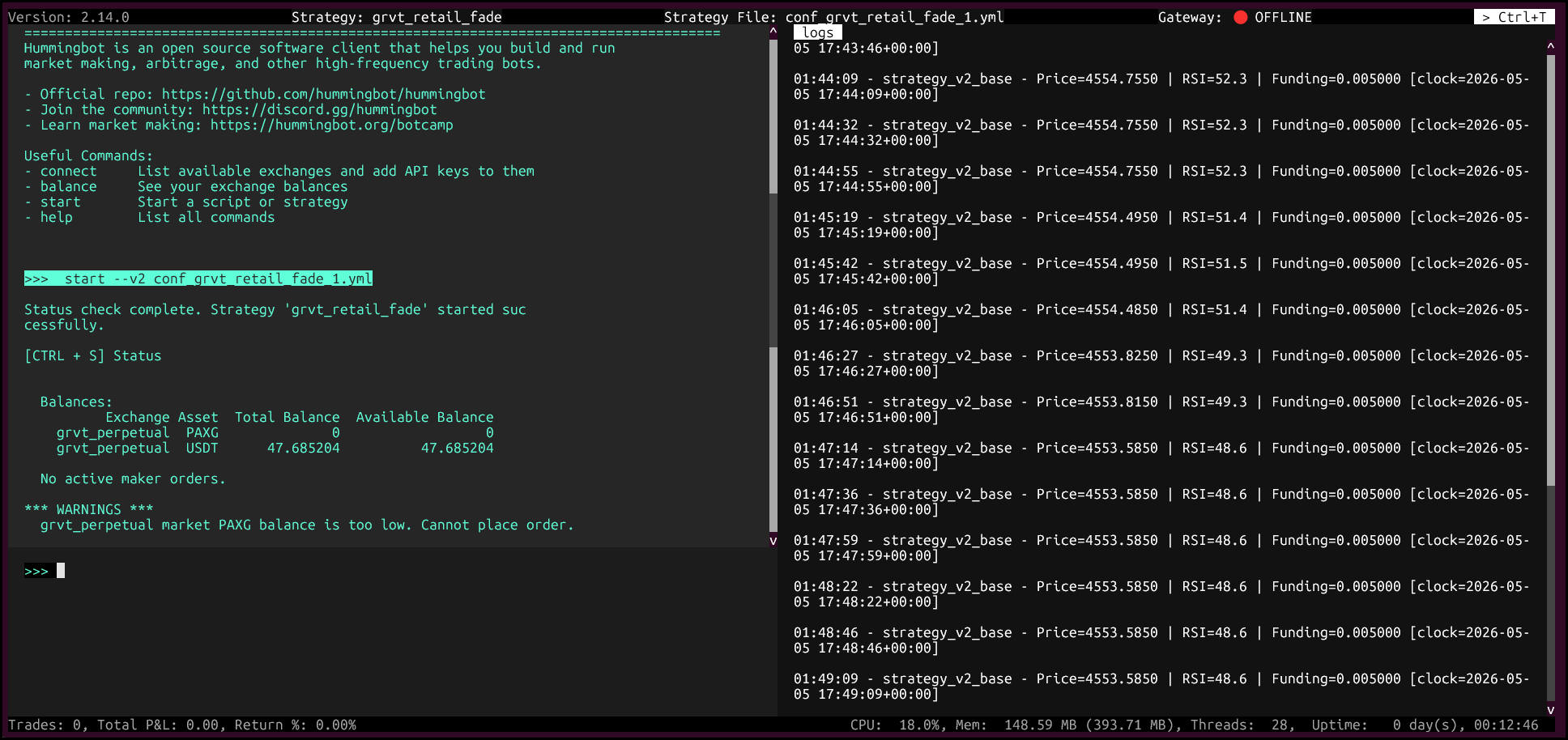
Check bot status:
Note
If you see a warning about low PAXG balance, you can ignore it for this setup. This guide trades perpetuals, so the required quote balance is USDT.
Code walkthrough
on_tick and executor lifecycle
The strategy runs on StrategyV2Base, so on_tick does more than signal checks: it throttles by cycle_sleep_sec, refreshes executor state with update_executors_info(), archives finished executors through store_actions_proposal(), and only evaluates new entries when there is no active executor.
Position management via PositionExecutor
The script no longer manages TP/SL manually in the loop. Instead, _open_position() creates a PositionExecutorConfig with a TripleBarrierConfig (take_profit_pct, stop_loss_pct, and market order type). Once created, the executor orchestrator manages the open position lifecycle.
RSI calculation
RSI now uses the Strategy V2 market data provider path:
- A candles feed is initialized in
__init__viainitialize_candles_feed(CandlesConfig(...)). _get_rsi()reads fromget_candles_df(...)and computes RSI with an EMA-based method (ewm) instead of a simple rolling average.
Funding rate confirmation
Funding is still fetched with connector.get_funding_info(trading_pair). The strategy only opens:
- Long when RSI is below
rsi_oversoldand funding is belowfunding_short_threshold - Short when RSI is above
rsi_overboughtand funding is abovefunding_long_threshold
Position sizing and quantization
Notional is calculated as min(available_balance * trade_size_pct, max_position_notional). Order amount is then normalized with connector.quantize_order_amount(...) before creating the executor, which keeps submitted size aligned with exchange precision rules.
Configuration reference
Below is a configuration example for the current script version (GRVTRetailFadeConfig). Since this is a script config map, YAML-style key/value entries are expected.
script_file_name: grvt_retail_fade.py
controllers_config: []
exchange: grvt_perpetual
trading_pair: PAXG-USDT
rsi_period: 14
rsi_candle_interval: 3m
rsi_overbought: 68.0
rsi_oversold: 32.0
candle_lookback: 50
funding_long_threshold: 0.0001
funding_short_threshold: -0.0001
trade_size_pct: '0.50'
max_position_notional: '1000.0'
take_profit_pct: '0.006'
stop_loss_pct: '0.004'
cycle_sleep_sec: 24
Field notes for this script version:
- Signal controls:
rsi_period,rsi_candle_interval,rsi_overbought,rsi_oversold,funding_long_threshold, andfunding_short_thresholddefine entry logic. - Risk controls:
take_profit_pctandstop_loss_pctare enforced by the Position Executor's triple-barrier settings. - Sizing controls:
trade_size_pctscales by available USDT balance, whilemax_position_notionalcaps per-trade notional. - Cycle controls:
cycle_sleep_seccontrols how often the strategy evaluates signals.
Parameter tuning guide
| Parameter | Conservative | Moderate | Aggressive |
|---|---|---|---|
trade_size_pct |
0.20 | 0.50 | 0.80 |
stop_loss_pct |
0.002 | 0.004 | 0.008 |
take_profit_pct |
0.004 | 0.006 | 0.010 |
max_position_notional |
$200 | $1,000 | $5,000 |
cycle_sleep_sec |
45 | 24 | 10 |
funding threshold |
0.0002 | 0.0001 | 0.00005 |
Start with smaller sizing and lower max_position_notional, then increase gradually after verifying logs, fills, and executor behavior in live conditions.
Risk management checklist
Go through this before starting your bot with real funds.
Pre-launch
- Script config values are reviewed (
trade_size_pct,max_position_notional,take_profit_pct,stop_loss_pct, thresholds) - API key has Trade permission only — no withdrawal permissions
-
max_position_notionalis set to an amount you are comfortable losing in full - Secret Private Key is stored in a password manager, not in a plain text file
- Use a dedicated low-risk trading sub-account or wallet context for API keys when possible
- Logs are being written to your Hummingbot logs directory (for example
./logsin your Hummingbot project or a mapped Docker logs volume)
While running
- Check the bot at least once per day
- Watch for repeated stop-loss exits — this indicates the strategy is in a bad regime
- If funding rate swings wildly, consider pausing the bot manually with
stopin the CLI - Monitor your sub-account margin ratio in the GRVT UI — ensure you're not approaching liquidation
Strategy risk factors
RSI alone is not reliable in trending markets. If PAXG is in a strong multi-day uptrend, RSI will stay above 70 for days and fade signals will lose repeatedly. Consider adding a trend filter (e.g., only take fade signals if price is within 2% of its 20-period moving average).
Funding rate changes lag price moves. Funding is calculated and paid every 8 hours, so intraday the signal can be stale. Use it as confirmation, not a primary signal.
GRVT is a DEX — network/RPC outages can affect execution quality. Keep max_position_notional conservative and validate how the triple-barrier exits behave under real volatility before scaling up.
Monitoring and troubleshooting
Useful Hummingbot commands
>>> status          # Current strategy state, open orders, P&L
>>> balance         # GRVT sub-account balances
>>> history         # Completed trades this session
>>> trades          # Detailed trade log
>>> stop            # Gracefully stop the strategy (cancels open orders)
>>> connect grvt_perpetual  # Re-run if connection drops
Common issues
"You are not connected to grvt_perpetual"
Run connect grvt_perpetual again and verify the saved credentials. This can happen after restarting a container/session without reconnecting the exchange.
No new entries after a filled trade
Check whether an executor is still active. This script intentionally opens only one position at a time and waits until the previous executor is archived before re-entering.
RSI is always None
The candles feed needs time to warm up. If it never resolves, verify initialize_candles_feed(...) parameters (connector, trading_pair, interval) and ensure candles are available for your pair.
Bot opens and immediately closes positions
Your triple-barrier settings may be too tight relative to spread and volatility. Increase stop_loss_pct, reduce trade_size_pct, or tune entry thresholds to avoid low-quality signals.
Log location
Tail logs in real time:
Appendix: Quick reference card
Exchange ID:       grvt_perpetual
Perp instrument:   {BASE}_{QUOTE}_Perp   (e.g. PAXG_USDT_Perp)
Auth required:     API Key + Secret Private Key + Trading ID
Candles feed:      ✅ Available
Spot connector:    ❌ Not available
Funding cycle:     Every 8 hours
Strategy script:   ~/hummingbot/scripts/grvt_retail_fade.py

Key GRVT links:
  App:     https://app.grvt.io
  API:     https://api-docs.grvt.io/auth/
  Fees:    https://help.grvt.io/en/articles/9614699
  Discord: https://discord.gg/grvt
Disclaimer: This guide is for educational purposes only. Algorithmic trading involves substantial risk of loss. Past performance of any strategy does not guarantee future results. Always start with small amounts before trading real funds. The author takes no responsibility for financial losses incurred from using any code or strategies described here.